> For the complete documentation index, see [llms.txt](https://docs.codegiganten.de/plugin-documentation/llms.txt). Markdown versions of documentation pages are available by appending `.md` to page URLs; this page is available as [Markdown](https://docs.codegiganten.de/plugin-documentation/apps/marketing-aktionen-banner-popups-and-listing-storer.md).
# Marketing-Aktionen: Banner, Popups & Listing-Störer
Zeitgesteuerte Banner, Popups und Listing-Störer für Shopware 6 – mit Assistent, Countdown, A/B-Tests und Live-Vorschau
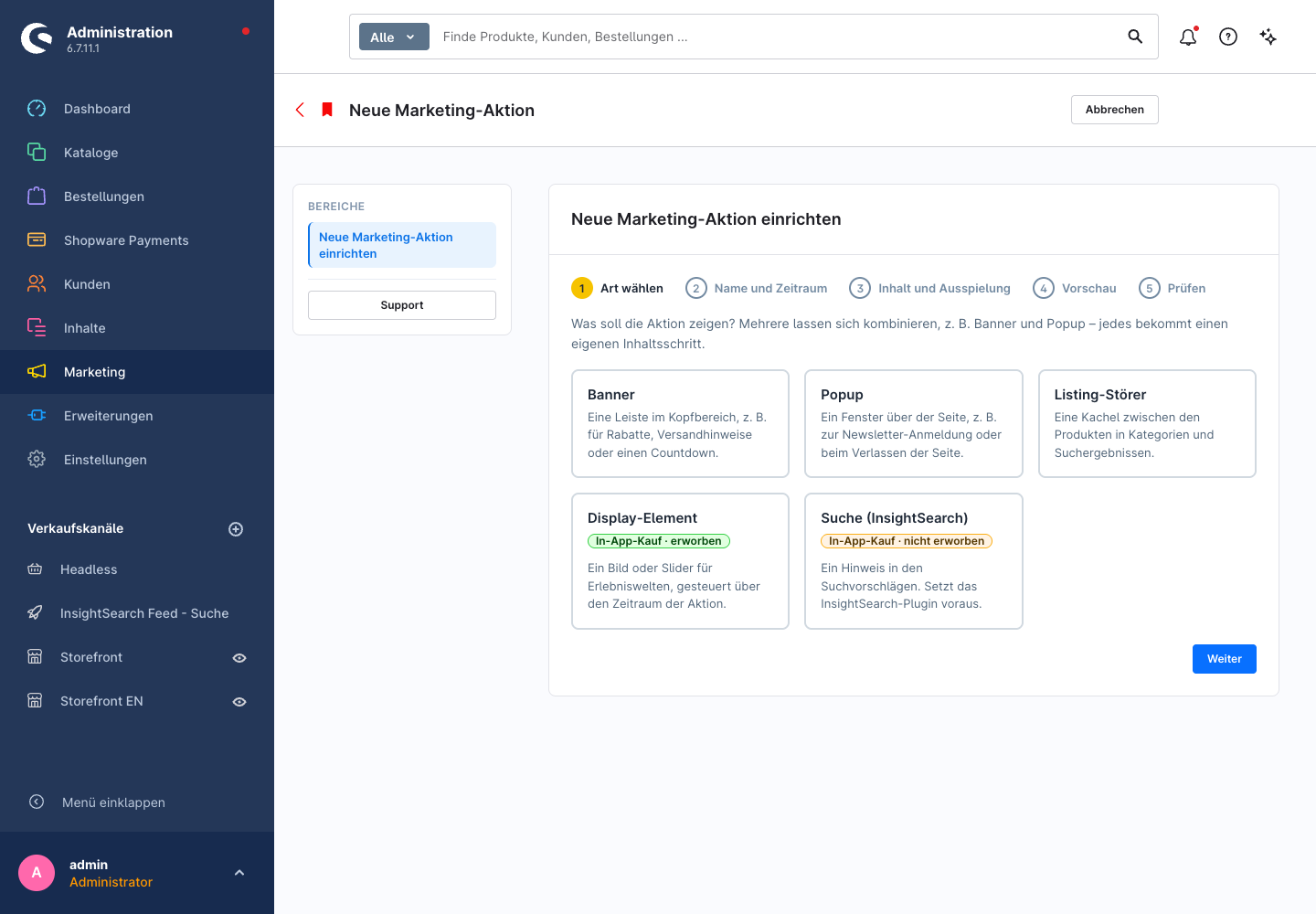
Mit Marketing-Aktionen planst du Kampagnen an einer Stelle: einen Banner im Kopfbereich, ein Popup und eine Kachel zwischen den Produkten. Alles läuft in einem gemeinsamen Zeitraum und geht zum Ende der Aktion von selbst wieder aus.
Ein typisches Beispiel: Black Friday mit Countdown-Banner und Rabattcode, dazu ein Popup für die Newsletter-Anmeldung und ein Störer in der Kategorie „Sale“.
Banner mit Rabattcode und Countdown
### Was eine Marketing-Aktion enthalten kann
| Inhalt | Wo er erscheint | Mehr dazu |
| --------------- | --------------------------------------------------------------- | -------------------------------------------------------------------------------------------------------------------------------------------------------- |
| Banner | Leiste im Kopfbereich, z. B. mit Rabattcode und Countdown | [Banner](/plugin-documentation/apps/marketing-aktionen-banner-popups-and-listing-storer/banner.md) |
| Popup | Fenster über der Seite, z. B. zur Newsletter-Anmeldung | [Popup](/plugin-documentation/apps/marketing-aktionen-banner-popups-and-listing-storer/popup.md) |
| Listing-Störer | Kachel zwischen den Produkten in Kategorien und Suchergebnissen | [Listing-Störer](/plugin-documentation/apps/marketing-aktionen-banner-popups-and-listing-storer/listing-storer.md) |
| Display-Element | Bild oder Slider in einer Erlebniswelt (In-App-Kauf) | [Display-Elemente und Suchhinweise](/plugin-documentation/apps/marketing-aktionen-banner-popups-and-listing-storer/display-elemente-und-suchhinweise.md) |
| Suchhinweis | Hinweis in den Suchvorschlägen von InsightSearch (In-App-Kauf) | [Display-Elemente und Suchhinweise](/plugin-documentation/apps/marketing-aktionen-banner-popups-and-listing-storer/display-elemente-und-suchhinweise.md) |
Dazu kommen die [Auffüll-Störer](/plugin-documentation/apps/marketing-aktionen-banner-popups-and-listing-storer/auffull-storer.md). Sie gehören zu keiner Aktion und schließen dauerhaft offene Reihen am Ende einer Listing-Seite.
### Was alle Inhalte einer Aktion teilen
Name, Verkaufskanal, Zeitraum und das optionale Zeitfenster (Wochentage und Uhrzeit) stellst du einmal pro Aktion ein. Sie gelten für jeden Inhalt der Aktion. Läuft die Aktion ab, verschwinden Banner, Popup und Störer gemeinsam.
Jeden Inhalt schaltest du trotzdem einzeln an und aus. So kannst du ein Popup schon vorbereiten und erst später freigeben.
### Was das Plugin nicht macht
Das Plugin zeigt Rabatte an, es gewährt sie nicht. Den Rabatt selbst legst du wie gewohnt unter **Marketing → Rabatte & Aktionen** an. In der Marketing-Aktion trägst du dann den passenden Code ein und kannst die Rabattaktion für die [Auswertung im cogi Commander](/plugin-documentation/apps/marketing-aktionen-banner-popups-and-listing-storer/auswertung-im-cogi-commander.md) verknüpfen.
### Screenshots
Popup mit Bild
Störer und Auffüll-Störer im Listing
Assistent
Live-Vorschau
---
# Agent Instructions
This documentation is published with GitBook. GitBook is the documentation platform designed so that both humans and AI agents can read, navigate, and reason over technical content effectively. Learn more at gitbook.com.
## Querying This Documentation
If you need additional information that is not directly available in this page, you can query the documentation by asking a question.
Perform an HTTP GET request on the following URL with the `ask` and `goal` query parameters:
```
GET https://docs.codegiganten.de/plugin-documentation/apps/marketing-aktionen-banner-popups-and-listing-storer.md?ask=&goal=
```
`ask` is the immediate question: it should be specific, self-contained, and written in natural language.
`goal` is what the user is ultimately trying to achieve, the reason they need the answer. Sharing it helps GitBook give you a better, more relevant answer. A goal is most helpful when it describes the outcome the user wants rather than restating the question. For example, with `ask=how do I create an API token`, a goal like `automate deployments from our CI pipeline` lets GitBook tailor the answer to that use case.
The response will contain a direct answer to the question and relevant excerpts and sources from the documentation.
Use this mechanism when the answer is not explicitly present in the current page, you need clarification or additional context, or you want to retrieve related documentation sections.